

Online class booking
Members browse the timetable across branches and book, cancel or join a waitlist from the GymViz app.
Members book classes and personal training from their phone. Live capacity, waitlists and automatic reminders keep every session full and cut no-shows.
Gym booking software lets members reserve classes, personal training sessions and spots online instead of calling or queuing at the front desk. It shows live capacity, manages waitlists and cancellations, and reminds members before each session.
GymViz works as both fitness class booking software and an online membership booking system. Members book and cancel classes in the GymViz app. New and renewing members can request a plan online and pay through a secure link, and bookings, payments and access stay in sync with the gym dashboard.
Members book in the app. Staff watch every class fill up on the dashboard in real time.
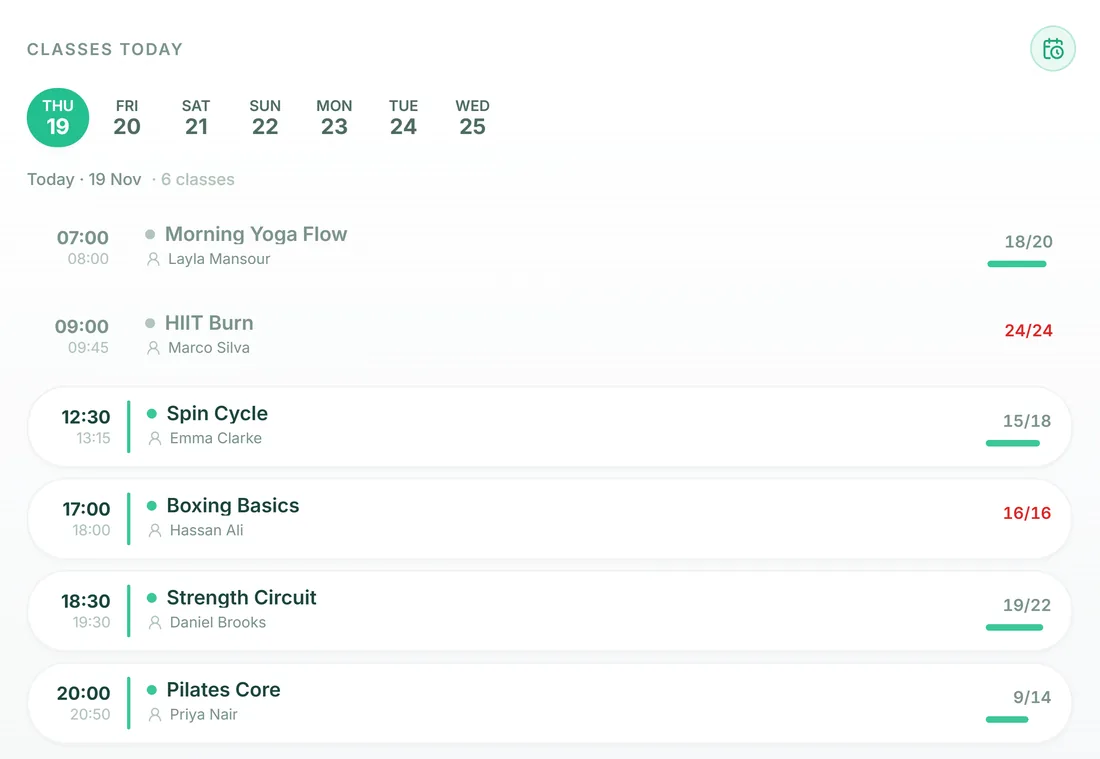
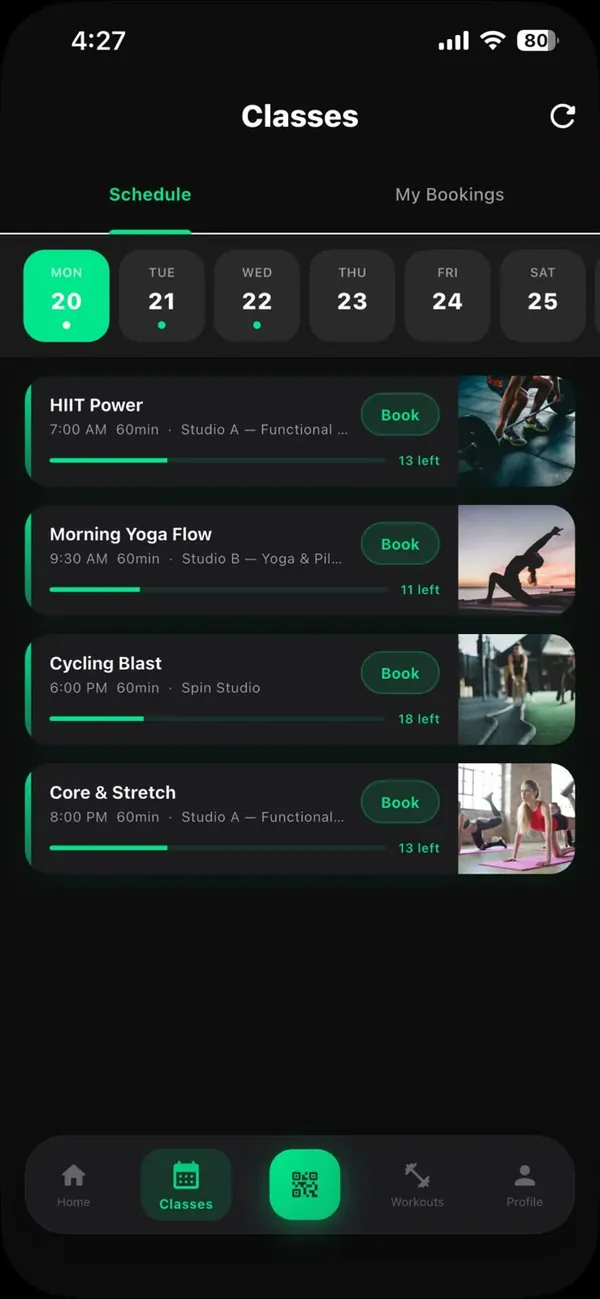
Members browse the timetable across branches and book, cancel or join a waitlist from the GymViz app.
Capacity caps stop overbooking. When a spot opens, the next person on the waitlist moves up automatically.
An automatic reminder goes out 24 hours before each class, the simplest way to reduce no-shows.
Set cancellation windows and booking limits per plan so popular classes stay fair for everyone.
Members book personal training against their PT package, and sessions are counted down automatically.
Prospects and members request a plan online and pay by secure link. The membership activates as soon as payment lands.
Add classes, instructors, rooms and capacity, once or as a recurring schedule.
They see live availability and book or join the waitlist in seconds.
WhatsApp reminders are sent automatically before each session.
QR or biometric entry marks the booking as attended.
Phone and walk-in bookings leave classes half-empty one day and overbooked the next. Online booking with live capacity shows members exactly what is available, and waitlists turn late cancellations into filled spots instead of empty mats.
For studios and gyms with a busy timetable, the booking data is just as valuable. You can see which classes, times and instructors fill fastest, and plan the next timetable around them.
Because booking runs inside GymViz rather than a separate app, it always knows what a member is entitled to. Expired members cannot book, class-pack balances update after each class, and PT sessions are counted against the package that was sold.
Timetables in the region change with the seasons. Ramadan brings late-evening classes, and summer shifts demand to early mornings. GymViz makes it easy to publish seasonal schedules and let members know on WhatsApp the moment they go live.
It is software that lets members book classes and personal training online, with live capacity, waitlists, cancellation rules and automatic reminders. In GymViz it is connected to memberships, billing and check-in.
Yes. Members book, cancel and join waitlists in the GymViz member app on iOS and Android, and see the timetable across all branches.
When a class is full, members can join the waitlist. If someone cancels, the next person on the waitlist moves into the class automatically.
Yes. Members book PT sessions against their PT package, and the remaining session count updates automatically after each session.
Yes. GymViz sends WhatsApp reminders 24 hours before each class to reduce no-shows.
Prospects can request a membership online and pay through a secure payment link. The plan and access activate as soon as the payment is received.
See how GymViz handles your timetable, capacity and reminders in a free demo.